

Design mode, the device picker and Excel export run today. The AI design assistant (included at no extra cost when it ships) and a BOM export are on the roadmap.
Design it before you build it
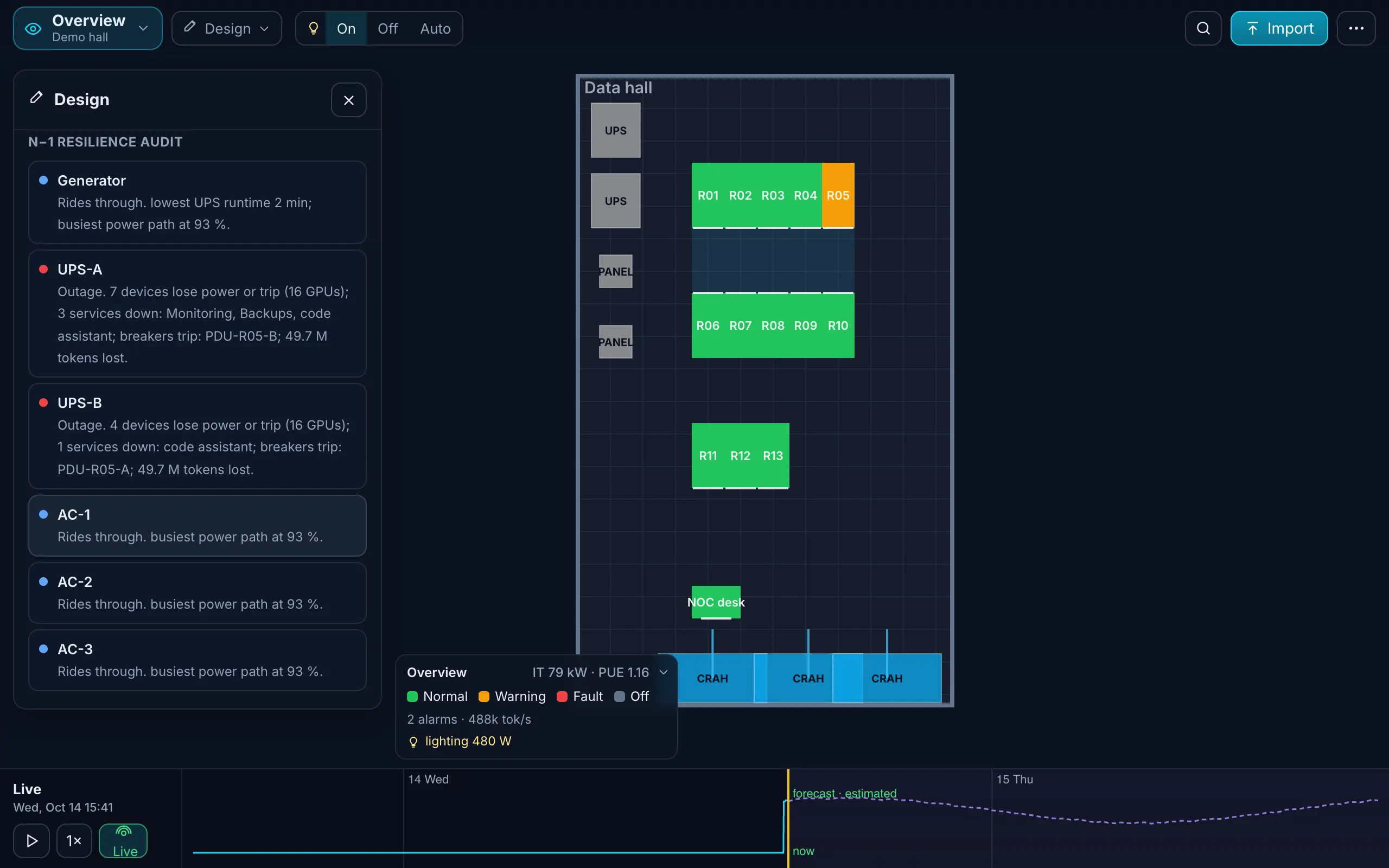
Design mode is for the room that does not exist yet, or the row you are about to add. Draft on a 2D plan: place, drag, rotate and delete racks and coolers, add devices from the catalog, while design checks run live: U fit, weight, clearance, breaker load, cooling against heat. Run the N−1 audit, publish a version, and the same model becomes the twin of the running room.
What you do in Design mode
- Plan on the 2D canvas and switch to 3D at any time: place, drag, rotate and delete racks and coolers.
- Add any device: pick it from the catalog (category, brand, model, or search, with the drawn front panel, U, depth, weight and idle, typical and max power), or describe your own once and reuse it by name. Place it at a free U, or outside a rack on a desk or shelf.
- Live checks as you place things: U overlaps and collisions, rack weight, clearance, breaker and PDU load over 80 %, heat above cooling capacity, single-feed devices.
- N−1 resilience audit: fail each cooler, UPS module, feed and switch in turn; the report lists what survives and what does not.
- Versions: publish a design and keep working on the next; re-upload the as-built file later and get a change list of what differs.
- Estimates, labelled: kW and heat per rack come from catalog values and carry the “estimated” tag until real readings arrive.
- Excel export: download the model as the filled template; it re-imports to the same devices, custom devices, cables and power chain. A BOM export Roadmap
Design → Monitor in one tool
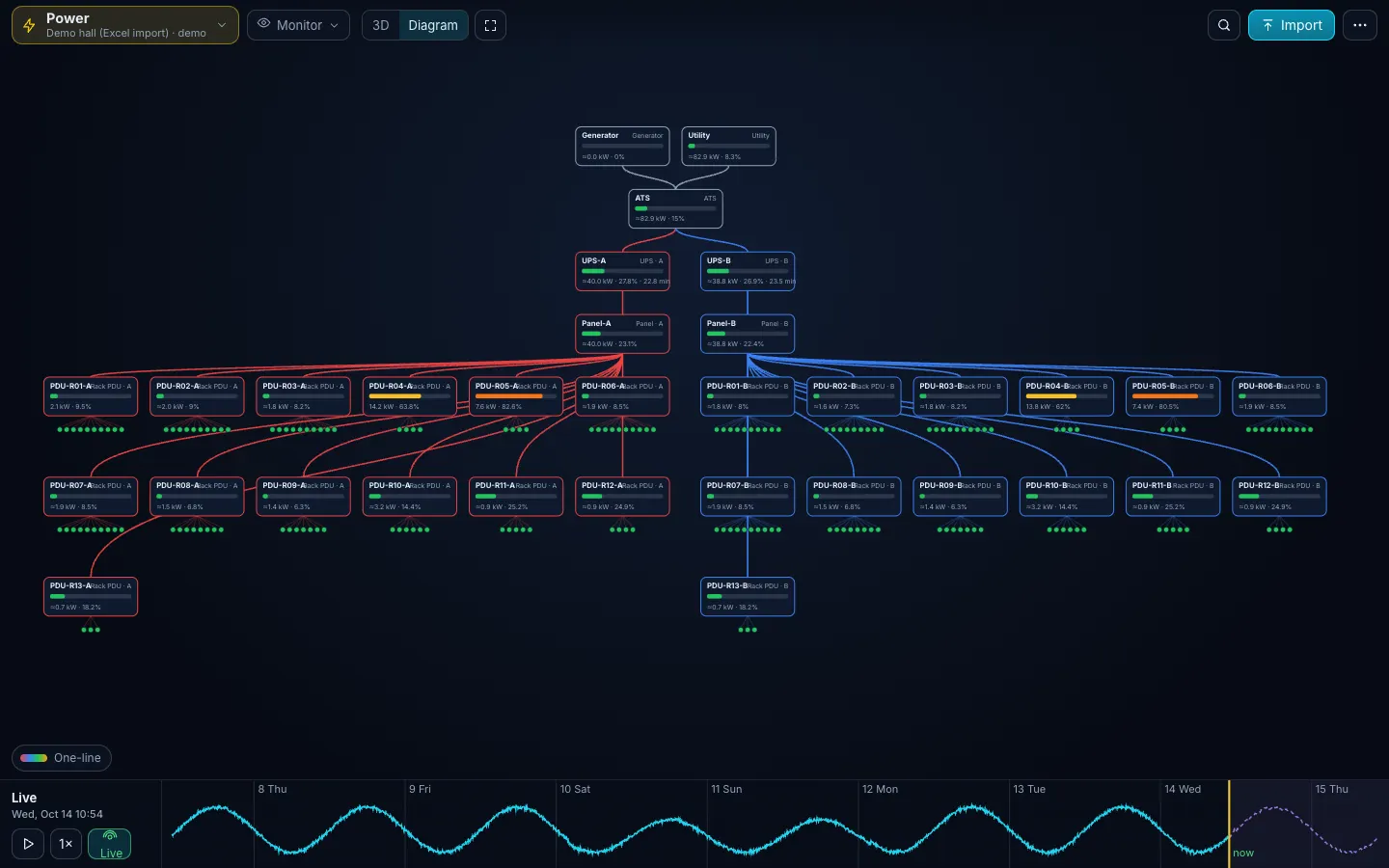
This is the point of the product. The design you win the project with is the model the customer runs on for years: no re-entry into a DCIM, no second drawing. Import the as-built and Monitor takes over the same racks, chains and cables. A Design customer who goes live gets the first three months of Monitor free.
AI design assistant Roadmap · included at no extra cost
Describe the room in a short brief: floor area, available kW, the cooling you can get, the workload (“64 GPU training nodes, 2 PB storage, 40 general servers”), redundancy target, budget and growth. The AI design assistant will propose rack count and density, row and aisle layout, air versus liquid, UPS and PDU sizing with A/B chains, cooling units, fire zoning and a bill of materials from the catalog, with two or three alternatives (cheapest, densest, most resilient).
The assistant proposes; the engine verifies. Every proposal is loaded into the simulator and checked (U fit, weight, 80 % breakers, cooling against heat, redundancy paths) before you see it, and the output is the filled Excel template, so Design to Monitor stays one step. It is included in the Design license at no extra cost when it ships, and Design customers get it first as early access. Ask about early access.
For integrators and consultants
Put the twin in the proposal. Walk the customer through the room in 3D before a rack is ordered, show the N−1 audit, and stay on the twin after go-live. → Partner program
GPU cluster power planning in a small room is a density question: kW per rack, A/B feeds, cooling per row. Design mode shows the breaker and cooling consequences of each node you place. For the first numbers, use the rack power calculator.
Is the AI design assistant available now?
Not yet. It is on the roadmap, included in the Design license at no extra cost when it ships, and comes first to Design customers as early access. Design mode itself (plan, device picker, checks, N−1 audit, versions, Excel export) runs today.
What does a Design license include today?
Design mode with the device picker, all checks and the N−1 audit, full what-if, Excel export of the model, three months per project (extendable), and the hand-off to Monitor with three months free. The AI design assistant comes at no extra cost when it ships; a BOM export is on the roadmap.
Can I design from an existing room?
Yes. Import the room and change it: add a row, swap to liquid-cooled racks, move a cooler. The checks and the audit show what the change does.
Does it produce drawings for the contractor?
It exports the design as the filled Excel template (racks, devices, custom devices, cables, power chain), which the installer can read and which re-imports unchanged. A BOM export and DXF/IFC import are on the roadmap.
What does the catalog know about a model?
Size, weight, power, airflow, cooling type and the parts inside, from public documentation. Performance fields (compute, GPU throughput, storage IOPS, network bandwidth) are being added for sizing.
Pricing that fits a 10-rack room
Design
from $490 per project, one-time
Plan a room or a new row; three months per project. The AI design assistant comes at no extra cost when it ships.
Monitor
$5 per rack per month, min $49
The twin of a running room, with what-if and reports.
Partner
30 % margin
For integrators, MSPs and consultants.
One Excel file. Your room in 3D.
Download the import template (v1.3, nine sheets, only Devices required) and the filled example from our demo hall. No form, no email needed, no macros in the files.
Fill in the Devices sheet and send it with your walkthrough request; we import it on the call. What each sheet does